|
sysadmin tools
In other of their ongoing series linux.com sysadmin toolbox I just learned about a few new tools.
There's htop, a command line version of top, slightly more visually user friendly. Nano I already know about, and agree, it's simple, works, and doesn't take a CS degree to figure out how to use. But then the real kicker, check this one out if you haven't, it's really slick: filelight. This one is amazing, shows you each disk that is mounted in graphical mode in terms of disk consumption. It has a really a really creative way to do that, the image is concentric circles, each layer correspons to one step up the file system, so if you are say looking at your / , it will show you how each directory is using hard disk space. If you're using debian apt based systems, it's just an :: Code :: su
<your password> apt-get install filelight away. This is a good one, showed me right away some unexpected stuff, like apt caching the stuff it had downloaded for upgrades and so on. Here's some screenshots, each time you click on a part of a circle it expands it to that section of the file system, in this case the sequence is: / /usr /usr/lib 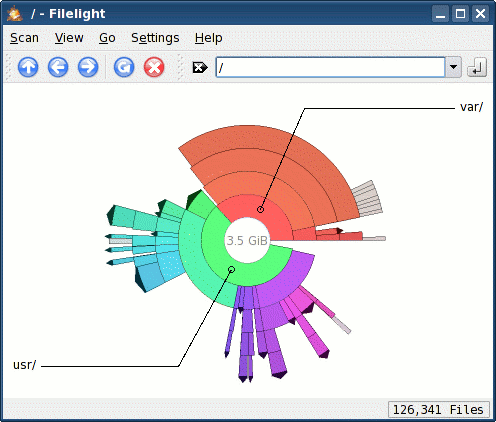
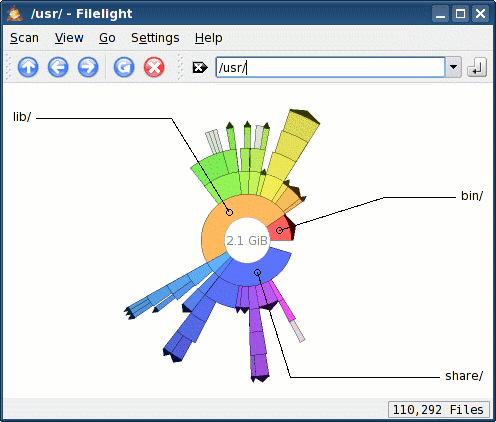
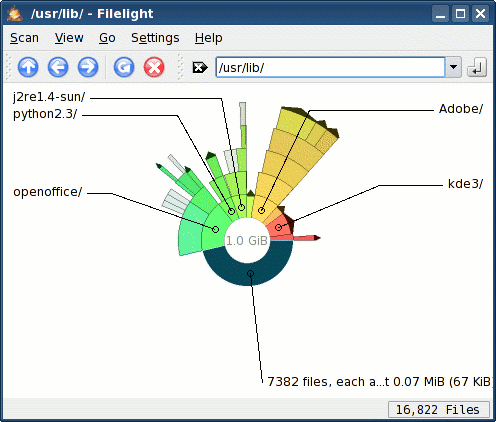
Pretty slick if you ask me. Screenshots: ksnapshot; processing: the Gimp. Back to top |
|
All times are GMT - 8 Hours |